
In Freelo's paid plans, you pay for a licence for each team member. The exception are Guests (available on the Business or Premium plan) – clients or external collaborators you can invite for free, up to 100 per team, with each Guest able to work in a maximum of 2 projects. In this article you'll learn how the Trial works, what the difference is between a paid account and the Free plan, and how to set up roles in your team properly.
Every user who registers on their own starts with a 14-day Trial, during which Freelo is completely unrestricted. But what happens once this period ends? What's the difference between paid plans and the free accounts?
The difference describes the picture below:
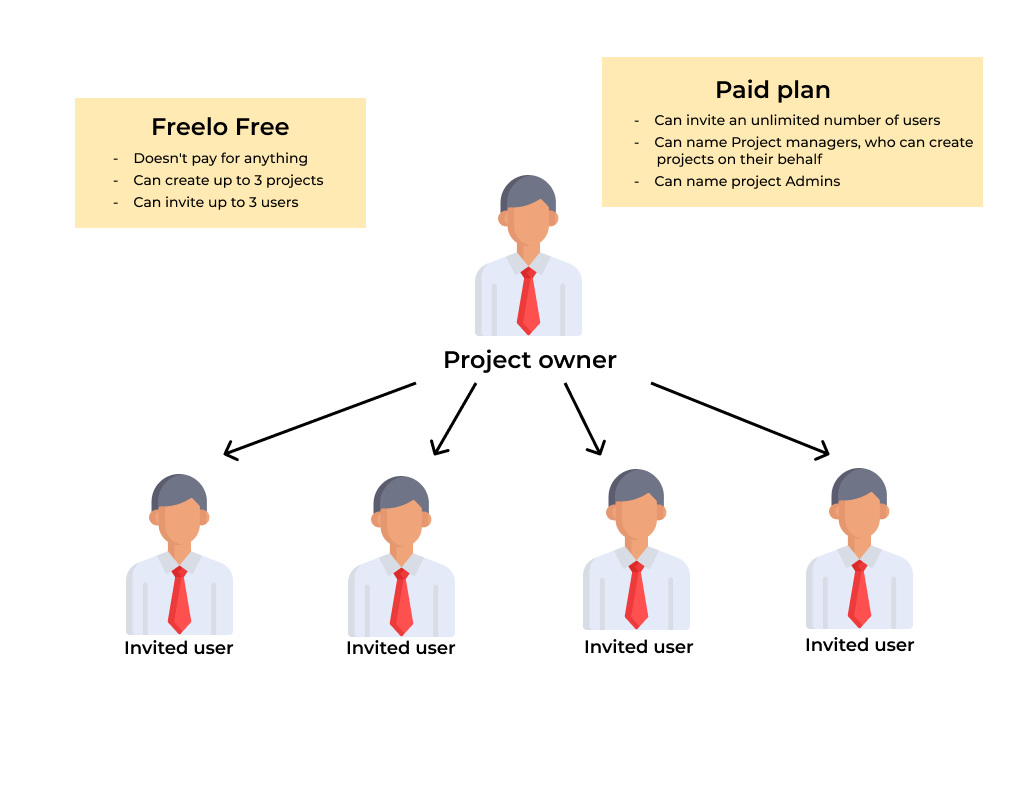
In Freelo's paid plans, you pay for individual licences for invited users. You only need one paid account (plan), through which you can invite an unlimited number of users, up to the limit of your purchased licences.
These users stay on the Free plan, where they can have up to 3 active projects of their own and invite 3 users for free. The user with the paid account creates projects and invites team colleagues, clients, or external collaborators into them.
The paid account is usually managed by the team lead, project manager, or company director – we call this person the Captain.
Freelo plans
You can pay for Freelo monthly or annually. Monthly payments are only possible online by credit card. For annual payments, you can choose between an online card payment or a proforma invoice paid by bank transfer. With the annual plan, you automatically get a 14% discount.
Check out our pricing and plan descriptions.
Trial
- It's a 14-day trial plan that everyone gets when they register a new account on their own.
- All Freelo features are available to you, so you can fully test everything.
- The trial period ends after 14 days, and you can choose to either continue on the Free plan (if you have 3 users or 3 projects invited) or choose a paid plan.
- If you don't meet the Free plan limit but still want to use it, we recommend transferring your projects to someone with a paid plan, or archiving them.
Tips & Tricks
-
- Only let selected people in your company create projects, and assign them the Project Manager role.
- Set up multiple Admins in your projects so that everything doesn't depend on just one person.
- The project owner can easily be changed by transferring your projects to them.
- Dividing your projects correctly is key – get inspired, or write to us and we'll be happy to help.
Practical use
- Small team or startup – the team lead gets a paid plan and sets up licences for all members. Clients are invited as Guests for free.
- Agency with clients – the team works on licences, and clients join selected projects as Guests without the need to purchase additional licences.
- Company with multiple departments – one company account, with Project Managers in each team independently creating projects and inviting colleagues.
- Freelancer with multiple clients – a separate project for each client, with clients as Guests seeing only what you allow them to.